IFT-01 CUSTOMER HELP
Simple answers.
Clear cockpit guidance.
Learn how to power IFT-01, connect your EFB, read receiver status, use the traffic display and understand the limits of the information shown.
QUICK START
Plug in. Connect. Confirm.
- Place IFT-01 securely, keep the enclosure unobstructed, and give the unit a clear view of the sky.
- Connect approved USB-C power. IFT-01 starts automatically.
- Join Wi-Fi IFT-01 on your phone or tablet.
- Open your compatible EFB and select its supported external ADS-B or GDL 90 receiver option if required.
- When finished, unplug IFT-01. No shutdown procedure is required.
Optional status page: ift01.local
HELP ARTICLES
Choose what you need.
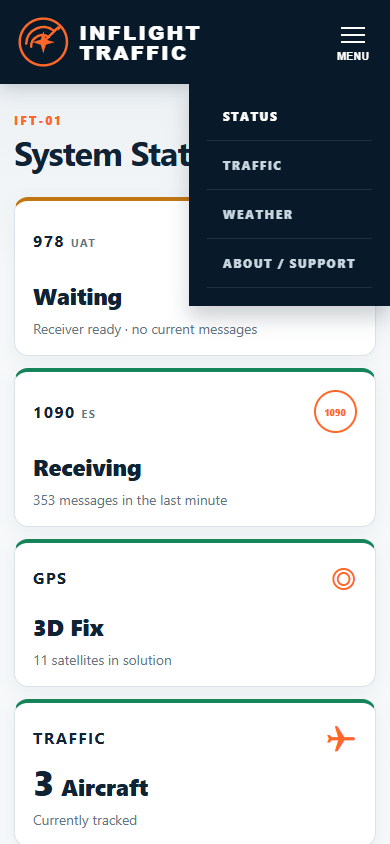
Each guide uses live IFT-01 interface screenshots captured September 6, 2026.
Quick Start
Placement, antennas, power, Wi-Fi and the first receiver check.
OPEN GUIDE →02 · RECEIVER HEALTHStatus page
READY, DEGRADED and FAULT states plus every status card.
OPEN GUIDE →03 · ADVISORY TRAFFICRadar and List
Range controls, aircraft details and honest missing-position behavior.
OPEN GUIDE →04 · POSITION + WEATHERWeather and GPS
GPS fix states, placement and what Waiting for FIS-B means.
OPEN GUIDE →05 · GDL 90Connect an EFB
Join IFT-01 Wi-Fi and connect a compatible electronic flight bag.
OPEN GUIDE →06 · USE RESPONSIBLYCare and safety
Heat, placement, support, notices and operational limitations.
OPEN GUIDE →Advisory information only.
IFT-01 is receive-only supplemental situational-awareness equipment. It is not FAA-certified or FAA-approved avionics, ADS-B Out, navigation equipment or a collision-avoidance system.